
Claude Code Uses Grep. Is Vector Search Still Worth It?
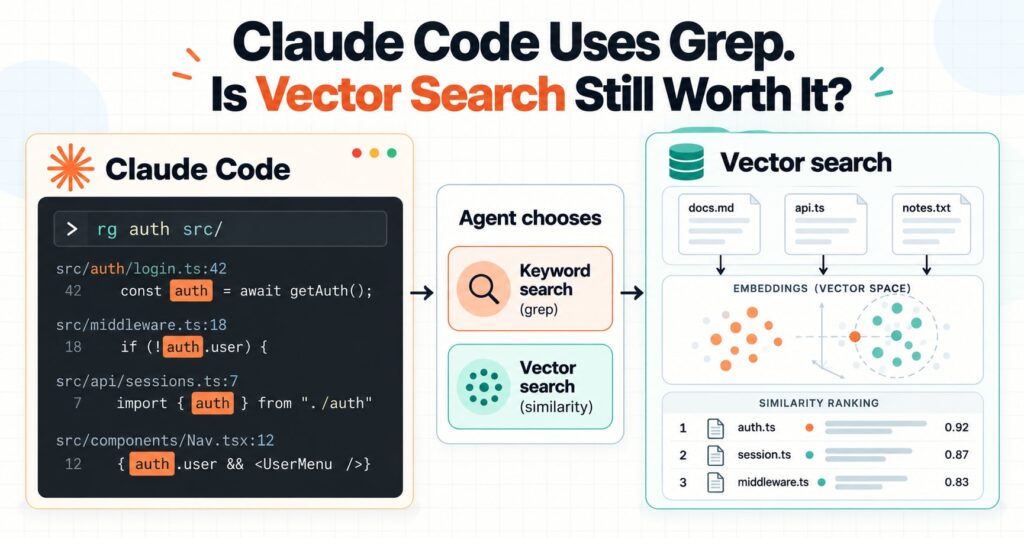
In brief: Claude Code’s documented use of ripgrep shows how capable agent-led search can be. It does not prove Claude Code replaced vector search, or that vector search is obsolete. Keyword search is often simpler for exact names and current source files; semantic retrieval can help with vague questions and paraphrases. Choose with evidence from the questions your users actually ask.
For years, adding memory to an AI assistant often meant splitting conversations and documents into chunks, embedding those chunks, storing the vectors, and retrieving the top matches before each answer. That pattern worked, but it also created an index to maintain and made a similarity score decide what the model saw.
Claude Code and Cursor have brought a different approach into focus: give an agent search and file-reading tools, then let it decide what to inspect for the task at hand. That raises a useful question for anyone building an assistant: when is vector search for AI agents worth keeping, and when can a simpler search path do the job?
What Claude Code and Cursor actually show
Claude Code’s official FAQ says it ships with bundled ripgrep, a fast tool for finding text patterns in files. Anthropic also describes “just in time” context retrieval: keep lightweight references such as paths or links, then load relevant information at runtime through tools. This supports agent-led, on-demand retrieval. It does not establish that Claude Code once used a vector database and later removed it.
Cursor has made a more explicit product change. In a July 2026 forum reply, a Cursor staff member said the company was turning down semantic and embedding-based code indexing in favour of grep-based retrieval. Cursor describes Instant Grep as a local, per-repository index, with regular ripgrep as another search path. The staff member said their testing found that agents could search several candidate terms, inspect directories, read files, and refine their queries.
These examples should not be blurred together. Claude Code can search files with ripgrep. Cursor says it is changing its code-search product. The available sources do not prove that Claude Code “ditched vector search,” or that grep is best for every knowledge task. See the Claude Code FAQ, Anthropic’s context engineering guidance, and Cursor staff’s explanation.
Keyword search and vector search solve different problems
Keyword search looks for words or patterns that appear in the source. In a codebase, that might be a function name, error message, configuration key, or filename. It is fast and easy to inspect when the question contains clues that also occur in the files.
rg -n -i -C 2 --glob '*.md' 'refund|chargeback|billing dispute' ./knowledgeThis command searches Markdown files under ./knowledge, ignores letter case, and prints two surrounding lines for each match. You can see exactly which term matched and where. If a note calls a refund a “credit reversal,” however, the search will miss it until you try that wording too.
Vector search uses an embedding model to represent text as numbers that capture some aspects of meaning. It can retrieve a passage about a “credit reversal” for a query about refunds, even when they share no exact phrase. This can help when users describe an idea differently from the source, or do not know the right terms to search.
That flexibility has a cost. You must choose how to split documents, which embedding model to use, how to filter and rank results, and how to keep the index fresh. Similarity is a ranking signal, not proof that a passage answers the question. A vector database is also only one retrieval option within RAG, or retrieval-augmented generation. RAG can use keyword search, SQL, a document hierarchy, vectors, or a hybrid. Anthropic’s guide to contextual retrieval explains the common embedding pipeline and why semantic methods can still miss exact matches.
Why agent-led search changes the trade-off
A basic retrieval pipeline often searches once, ranks passages, and attaches the top few to the prompt. An agent can work in a loop: search an exact term, inspect a likely file, notice a missing detail, try related terms, then read the best source in context.
For example, “Where is refresh_token_ttl set?” is a strong exact-search query. “What happens when a customer cancels?” may require searches across routes, services, and tests. “What did we decide about the onboarding tone?” might be answered best by opening a named working note. One tool does not need to handle all three.
Early research supports testing this approach, but does not settle the debate. A 2026 preprint compared grep and vector retrieval across 116 LongMemEval questions and reports that grep often did better in the tested agent harnesses. It also says results depended on the harness and how tool output reached the model. Another preprint reports agentic keyword search reaching over 90% of the performance metrics of its RAG baselines. These are promising results for particular tasks and setups, not guarantees for every product. Read “Is Grep All You Need?” and “Keyword search is all you need”.
Where vector search fits in an assistant’s memory
Searchable knowledge comes in different forms. In the earlier Toffu setup described for this article, customer conversations and uploaded files were broken into small “memories,” embedded, and stored in Pinecone. Before each response, the system added the three closest matches, whether or not the agent had asked for them.
That was a reasonable way to supply context when models were less capable at deciding what to look up. It also meant every message triggered retrieval and the index had to stay aligned with changing information. The newer approach described here gives each kind of context a more direct route:
- Stable rules, such as brand voice, goals, and constraints, go in instructions the agent always receives.
- Working notes get stable names so the agent can open them when a task calls for them.
- Past conversations and uploaded files can be searched on demand, with follow-up queries and file reads.
- Live operational facts, such as advertising metrics, come from the source system instead of a potentially stale snapshot.
This is a design hypothesis, not a guarantee that keywords will find every important memory. It depends on useful note names, access to the right files, and an agent that can refine a failed search. Semantic retrieval may still help with vague recall across a large conversation history.
Logging is a separate design choice. A trace can record what the agent searched and opened, but a grep-based system is not automatically transparent and a vector system is not automatically opaque. The tools and product need to expose those decisions. For more on agent context, see Context Engineering for AI Agents: Memory, Retrieval, and Token Budgets. The interface an agent uses matters too, as discussed in LangChain MCP Adapter 2.0 and stateless tools.
When vector search still earns its place
Vector search remains useful when people ask in natural language without knowing the source’s vocabulary, when semantically related passages matter, or when the collection is too large or irregular for repeated broad scans. It may also help when an agent’s multi-step search adds too much latency.
Keyword search often fits better when users mention exact names, the corpus is code or structured text, freshness matters, and the agent can inspect the source directly. A direct database or API query may be better still for structured, changing values.
Hybrid retrieval is an option: use exact search for identifiers, semantic retrieval for conceptual questions, then verify important answers against the original source. Keep each component only if it solves a measured problem. Do not remove vectors because one coding tool uses grep, and do not keep embeddings simply because they were in the first design.
How to choose with evidence
Build a small evaluation set from real user questions. Include exact lookups, paraphrases, vague questions, questions requiring several sources, and questions whose answer is absent. Compare systems with the same model and answer instructions.
- Check answer quality. Did the agent find the source, include necessary context, and avoid unsupported claims?
- Count retrieval effort. How many searches and file reads did it need? Did different wording make it miss the right passage?
- Compare operating costs. Measure latency, token use, storage and embedding costs, index refresh work, and recovery from errors.
- Inspect the trace. Review actual queries and retrieved passages. A plausible answer can hide a lucky guess or a missed source.
- Choose per task. If grep handles code symbols and semantic search handles vague memory recall, use each where it proves useful.
Evaluate the full interaction, not retrieval scores alone. Anthropic’s guide to evaluating AI agents is a useful starting point. This site’s guide to tracing agent behaviour in production explains why the path and the outcome both matter.
Rethink the default, not the whole category
Claude Code illustrates how an agent can use ordinary search tools to navigate a codebase. Cursor’s change suggests grep-based retrieval can serve its code-search workflow without a semantic code index. Neither example proves that every assistant should discard vector retrieval.
Match search to the information and the question. Put always-needed rules in instructions, fetch live values from live systems, and let agents search when a task calls for it. Keep semantic retrieval where it measurably improves recall or saves effort. Then inspect the traces and test the answers. The best search stack is the one your users’ questions show they need.
The post Claude Code Uses Grep. Is Vector Search Still Worth It? appeared first on Alpesh Kumar.