
JWT Logout: How Do You Log Out a User When Tokens Are Stateless?
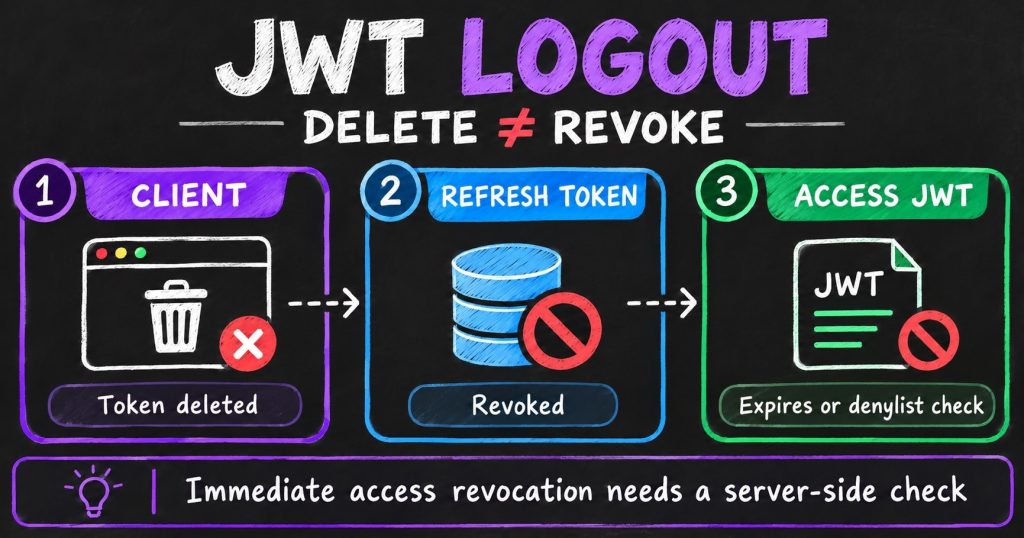
Quick summary: JWT logout
- Clear the client’s token: This signs out that browser or app, but a copied token can still work until it expires.
- Revoke the refresh token: This stops the session from getting new access tokens, though an existing JWT may remain valid briefly.
- Check server-side state for immediate revocation: A denylist or session check lets APIs reject a token before expiry, but adds a lookup to requests.
- Match the design to the promise: Short-lived access tokens and revocable refresh tokens work well for many apps; high-risk systems may need immediate checks.
A user clicks “Log out,” closes the page, and expects to be signed out. Yet a copied access token may still work. That is the central challenge with JWT logout: a stateless API can validate a token, but it cannot know that someone has since logged out unless it checks some shared state.
The right design depends on what “log out” should mean. Is it enough for this browser to forget the token? Must the session stop renewing? Or must every API reject the token immediately? Those are three different guarantees, with different costs.
Why a JWT does not have a logout switch
A signed JSON Web Token contains claims such as who it represents, who issued it, which service should accept it, and when it expires. An API can verify the signature and claims locally, without asking a session database about every request.
That makes the token convenient, but also means the API has no live session record to update when the user logs out. A signature shows that the token has not been tampered with. It does not show whether it has been stolen or revoked since it was issued. The JWT standard defines an expiry claim, not a built-in revocation command.
A useful way to think about this: deleting a token removes a copy; revoking a token changes what the server will accept. If an API checks only signature and expiry, it will accept a valid token until that expiry.
Three levels of logout
| What the user expects | What the system does | Can a copied access token still work? |
|---|---|---|
| Log out this browser | Delete the local token or clear the session cookie | Yes, until expiry |
| End this login session | Revoke its refresh token or server-side session | Possibly, until the access token expires |
| Stop access now | Make APIs check revocation or session state | No, after the revocation state reaches the API |
Most logout designs combine the first two. The third is important when the remaining access window is too risky, such as after a compromised device or for sensitive operations.
Option 1: Clear the client’s credentials
For local logout, the app deletes its access token and refresh token, then clears any user-specific data it has cached. If it uses a cookie, the server can expire that cookie using the same path and domain settings.
This makes the browser stop sending its copy. It does not invalidate another copy that an attacker may have obtained. A stolen bearer token remains usable until the server rejects it or its expiry time arrives.
Browser storage is part of the security decision. JavaScript-readable storage can be exposed by cross-site scripting. HttpOnly, Secure, and appropriately scoped SameSite cookies keep tokens out of ordinary JavaScript, but cookies are sent automatically and need suitable CSRF protection. A backend-for-frontend can keep OAuth tokens on the server and give the browser only a session cookie.
Option 2: Revoke the refresh token
A common pattern uses a short-lived access JWT for API calls and a longer-lived refresh token to get new access tokens. When the user logs out, the client asks the authentication service to revoke the refresh token or end its associated session.
- The app sends a logout request to the authentication service.
- The service revokes the refresh token or session for that device.
- The app clears its local tokens and user data.
- Any access JWT already issued remains usable until it expires, unless APIs also check revocation state.
This gives a practical compromise: the client cannot keep refreshing its session, and short access-token lifetimes limit the time a copied token can be used. It does not promise that every API will reject that access token immediately.
OAuth RFC 7009 defines a token-revocation endpoint. Authorization servers must support refresh-token revocation and should support access-token revocation. For a self-contained JWT, however, an API must check some revocation mechanism to know that the token was revoked.
For public OAuth clients, RFC 9700, OAuth 2.0 Security Best Current Practice, requires refresh-token replay detection through sender-constrained refresh tokens or refresh-token rotation. Rotation replaces a refresh token each time it is used. Reuse of an invalidated token can signal compromise and cause the active token family to be revoked.
Option 3: Make APIs check revocation state
If a valid access JWT must stop working before its expiry, APIs need a way to learn that it has been revoked. A common solution is a shared denylist.
Give each token a unique jti identifier and include its trusted issuer in iss. On logout, record the token’s identifier as revoked until its expiry. When an API receives the token, it verifies the JWT and checks whether that issuer and identifier appear in the denylist. OWASP’s JWT guidance describes this approach.
The benefit is direct: an API can reject a token before it expires. The cost is that each protected request now depends on a state lookup, often in a shared store such as Redis. That adds latency and an operational dependency. If the store is unavailable or updates propagate slowly, services need a clear policy for whether to deny access or temporarily accept otherwise valid tokens.
Use verified claims such as iss and jti for denylist keys. OWASP warns that using the raw JWT or its hash can be unsafe in some implementations. Keep each record only until the token expires.
Alternative: Track sessions instead of individual tokens
You can also put a session identifier or token-version number in each JWT and compare it with current server-side state. Mark one session as revoked to sign out one device. Revoke all of a user’s sessions, or raise their token version, to sign them out everywhere.
This is often easier to manage across multiple tokens, but it still requires an API lookup or a cache of current session state. A per-user version also has a broad effect: changing it may invalidate all of that user’s tokens, not just one device.
An opaque access token is another option. It is a random reference that an API resolves through a server-side store, so the issuer can revoke it centrally. That makes revocation straightforward but puts a lookup in the request path. The trade-off is not “JWT or no state”; it is where to keep state and which services must check it.
Which JWT logout approach should you choose?
- Ordinary app logout: Clear local credentials, revoke the refresh token, and keep access tokens short-lived.
- Sign out one device: Keep a revocable session or refresh-token family for each device.
- Sign out everywhere: Revoke all refresh sessions and, if needed, invalidate outstanding access tokens through a version or session check.
- Immediate response to compromise: Check a denylist or live session status on protected API requests.
For many applications, the best starting point is short-lived access JWTs plus revocable, rotated refresh tokens. Add an API-side revocation check only when the remaining access window is too long for the risk. If immediate session invalidation is a core requirement everywhere, a conventional server-managed session may be simpler than rebuilding session behavior around JWTs.
Make the logout promise clear
Design the endpoint around the result users expect. If it only clears a cookie, it signs out that browser. If it revokes a refresh token, that session cannot renew. If it also updates state checked by every API, it can stop access before the JWT expires.
For cookie-based credentials, protect the logout request against cross-site request forgery. Make repeated logout requests safe, and decide what happens if the authentication service is temporarily unavailable. A locally signed-out screen does not necessarily mean the server confirmed revocation.
OpenID Connect adds another distinction: ending your app’s session and ending the identity provider’s session are separate actions. Provider logout only reaches other applications that have implemented the relevant logout flow. It does not automatically invalidate a self-contained API token unless the API checks its status.
The simple rule to remember
A stateless verifier cannot instantly forget a token it has already accepted. Clear the client’s copy for local logout. Revoke refresh credentials to stop renewal. Add a shared session or revocation check when APIs must reject existing access tokens immediately.
That decision is one part of a broader system-design trade-off between independent services and shared state. For more on those architectural choices, see System Design Fundamentals: The Concepts That Still Matter.