
How to Load a 10 GB File Into a Database With 512 MB of RAM
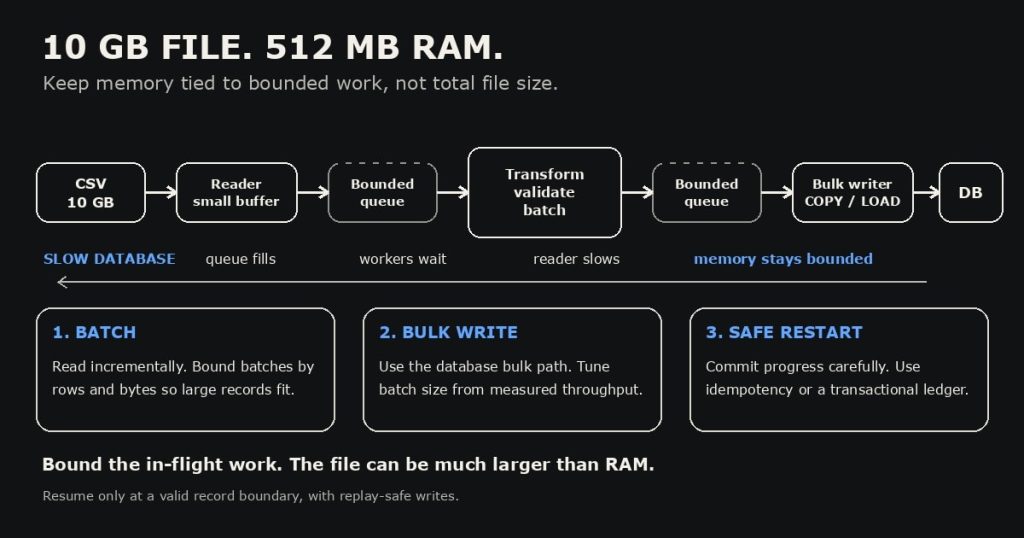
In brief
- For a 10 GB file and 512 MB of RAM, the file size does not require 10 GB of memory. Stream records and keep only bounded batches and buffers in memory.
- Use a pipeline: read, validate and transform, then bulk load into a staging or target table. Let bounded queues apply backpressure when the database slows down.
- Choose batch and queue limits from measured row size, transformation needs, database throughput, and recovery goals. “A few thousand rows” is only a starting estimate.
- Make restart behavior explicit. A saved file offset alone does not guarantee correctness; coordinate durable progress with database commits and use idempotent writes or transactions to handle replay.
How do you load a 10 GB file into a database when one machine has one CPU core and 512 MB of RAM? It is tempting to lead with Kafka or Flink. A stronger interview answer begins with the constraint: the process must never hold the whole file, or an unbounded number of records, in memory.
The core design is a bounded streaming pipeline. Read a limited amount, form a batch, transform it, and write it efficiently. Then explain how you will control memory, handle slow database writes, recover after a crash, and measure whether the design meets its throughput target.
Load a 10 GB file without filling memory
A 10 GB input is larger than available RAM, but that is not a problem if the program reads incrementally. A file stream or iterator can expose records a piece at a time. Memory depends on what the process retains: input buffers, parsed objects, batches, worker state, database client buffers, and queues between stages.
So “memory equals queue capacity times batch size” is a useful warning about boundedness, but not a complete formula. If a queue holds batches, a rough estimate is queue depth × average in-memory batch size, plus the active batches in each stage, parser buffers, and runtime overhead. If it holds rows, estimate queue depth × average retained row size instead. Parsed objects can be much larger than their encoded file representation.
For an interview, state the invariant clearly: every buffer has a known limit, and the program does not read ahead without bound. Set conservative limits, inspect peak resident memory under realistic row sizes, and tune from measurements.
How to load a 10 GB file in bounded batches
- Read incrementally. Use a streaming parser with a small input buffer. Avoid APIs that load the complete file or build a list of all parsed rows.
- Validate and transform. Parse each record, validate required fields and types, and decide what happens to malformed rows. Count and preserve rejected records for inspection instead of silently dropping them.
- Form bounded batches. Group records up to a configurable row or byte limit. A byte limit matters because one unusually large record can make a fixed row count consume far more memory than expected.
- Bulk write. Use the database’s bulk-loading path where it fits. PostgreSQL’s
COPYis designed for loading many rows with less overhead than a series of individual inserts. MySQL providesLOAD DATAfor loading rows from a text file. If application-side transformation prevents direct file loading, stream encoded batches through the client API. - Commit and record progress. Define what counts as safely completed, and persist progress only when the corresponding database changes are durable.
For a brand-new load, a staging table is often useful. It separates ingestion from validation and publication: load rows, check counts and constraints, then merge or promote the good data. The right transaction size depends on rollback cost, database limits, and recovery requirements. One transaction for the entire file may be too large; committing every row may add needless overhead.
PostgreSQL documents COPY as its preferred bulk-loading method for large row loads, while MySQL documents LOAD DATA. These are examples of database-specific bulk paths, not interchangeable commands. Check format, permissions, error handling, constraints, and operational limits for the database in the prompt.
If you are weighing streaming record formats for an ingestion pipeline, our guide to JSONL and line-oriented data explains why one-record-per-line formats can simplify incremental processing.
Use backpressure to keep memory bounded
Imagine the reader parsing faster than the database can write. If the program keeps adding rows to an unbounded queue, memory grows until the process slows or crashes. Instead, put bounded queues between stages. When the write queue fills, the transform stage waits. That slows the reader, so the source naturally follows the database’s pace. This flow control is called backpressure.
On one core, multiple worker threads do not create more CPU capacity. They can still help when stages wait on disk or database I/O, but they add coordination and memory costs. Start with a simple sequential pipeline or a small bounded producer/consumer design, then add concurrency only if measurements show useful overlap. Avoid claiming that concurrency automatically makes a one-core job faster.
Apache Flink’s documentation describes the same principle in a distributed pipeline: a slow downstream operator can fill buffers and propagate backpressure upstream. Kafka can provide durable buffering and decouple independently scaled producers and consumers, but it introduces brokers, deployment, monitoring, and delivery semantics to manage. It is a reasonable next step when the requirements call for durable decoupling, replay, multiple consumers, or horizontal scale, not an automatic first answer for a single-machine file load.
For additional interview framing, see our 45-minute system design interview blueprint, which covers how to clarify requirements before choosing components.
Load a 10 GB file safely after a crash
A file offset can help resume a load, but “save the byte offset after each commit” leaves an important question: what if the database commit succeeds and the process crashes before the offset is saved? On restart, that batch may be read again. If the offset is saved first and the commit fails, the batch may be skipped.
There are several ways to handle this. Use a stable record identifier and idempotent upserts, track completed batches in a durable load ledger, or coordinate the data write and progress marker in one transaction when both live in the same database. For a streaming framework, end-to-end exactly-once behavior requires the source to be replayable and the sink to be transactional or idempotent. Otherwise, design for at-least-once delivery and make duplicate processing safe.
Offsets also depend on the file format. A byte position is straightforward only when it points to a valid record boundary. CSV fields can contain quoted newlines; compressed files may not support arbitrary seeking; and a file may change between attempts. A robust checkpoint can include the file identity or checksum, parser format/version, record number or safe boundary, and batch identifier. On restart, verify that the input is the same before resuming.
Apache Flink explains that recovery can replay records from the last checkpoint and that exactly-once effects require a replayable source plus a transactional or idempotent sink. That is the useful principle even if your answer uses a small script rather than Flink.
What should you measure?
Do not promise a throughput number without knowing the record format, average and maximum row size, indexes and constraints, database location, disk speed, and required validation. Explain how you would find the bottleneck instead:
- Track rows and bytes read, transformed, accepted, rejected, and committed.
- Measure batch write duration, queue depth, database errors, and retry counts.
- Watch process memory and confirm it plateaus under a slow database and unusually large records.
- Test restart behavior after failures before and after a commit, then verify there are no missing or duplicate logical rows.
Increase batch size or concurrency only when measurements point to a specific bottleneck. Larger batches can improve write efficiency, but they also increase memory use, transaction duration, and the amount of work to retry after failure.
A concise answer you can give in the interview
“I would not load the 10 GB file into memory. I’d stream it with a bounded parser, validate and transform each record, accumulate a batch with both row and byte limits, then bulk-load it into a staging table. Every queue would have a fixed capacity so a slow database applies backpressure to the reader. I’d measure memory, throughput, rejected rows, and write latency before tuning the batch size. For recovery, I’d make writes idempotent or track batches transactionally, and save progress only in a way that cannot skip data or create unsafe duplicates. I’d start on one machine and introduce Kafka or a distributed processor only if durable decoupling, replay, multiple consumers, or measured throughput needs justify the extra system.”
That answer shows the interviewer you understand the underlying constraints. The file can be much larger than RAM when the amount of in-flight work stays bounded, and recovery correctness matters just as much as the happy-path load.