
How to Choose the Right Ecommerce Platform for Your Business

Quick summary
- Compare Shopify, WooCommerce, Magento and Drupal Commerce against your needs.
- Compare the full cost, including apps, payments and ongoing support.
- Shopify suits a managed start; WooCommerce can suit an existing WordPress site.
- Check how you can grow and export your data before you commit.
A beautiful online shop is not much help if you struggle to update products or process orders. Choosing the right ecommerce platform for your business starts with how you sell and who will run the store.
An ecommerce platform is the software that manages your online shop, products and orders. This guide explains what to compare, which trade-offs matter and how to test your shortlist before you pay.
Match your ecommerce platform to your business needs
Write down what you need at launch. Separate essential features from things you might want later. A shop selling handmade mugs has different needs from a wholesaler with customer-specific prices.
- Products: Will you sell physical goods, downloads, subscriptions or personalised items?
- Catalogue: How many products, sizes and colour options will you manage?
- Customers: Will you sell locally, overseas or to other businesses?
- Delivery: Do you need shipping, local collection or both?
- People: Who will add products, answer questions and manage returns?
For example, a clothing shop should test size options and exchanges. A subscription business should test repeat payments and cancellations. Use your real needs to rule out unsuitable choices early.
Compare hosted and self-hosted options
With a hosted platform, the provider runs the hosting as part of its service. With a self-hosted store, you or your chosen hosting partner take more responsibility for the technical setup.
Shopify includes hosting with its plans. It is one option to investigate if you want a managed service. Check the plan limits and any apps you need before choosing it.
WooCommerce is an open-source platform for WordPress. It is worth considering if you want control over your WordPress store. You still need to plan for hosting, updates, backups and technical support.
| Approach | When to consider it | What to check |
|---|---|---|
| Hosted platform | You want the provider to manage the hosting. | Subscription costs, app fees and limits on changes. |
| Self-hosted store | You need more control and have support available. | Hosting quality, maintenance costs and responsibility for fixes. |
Neither approach removes all work. You still need accurate product details, useful customer service and a clear process for fulfilling orders.
Ecommerce platform comparison: Shopify, WooCommerce, Magento and Drupal
These four options suit different teams and budgets. For Drupal, the ecommerce option compared here is Drupal Commerce, which adds shop features to Drupal. Magento Open Source and the commercial Adobe Commerce products are also different offerings.
| Platform | Good fit | Cost and upkeep |
|---|---|---|
| Shopify | A new shop that wants managed hosting and a straightforward start. | Paid subscription, plus any apps, design work and payment fees. |
| WooCommerce | A WordPress website that needs an online shop and flexible content. | Free core software. Budget for hosting, extensions and maintenance. |
| Magento Open Source / Adobe Commerce | A store with complex requirements and a specialist development team. | Open Source has no software licence fee. Adobe Commerce has commercial pricing. Both need an implementation budget. |
| Drupal Commerce | A Drupal website combining substantial content with custom buying journeys. | Free open-source software, with hosting, configuration, development and support costs. |
The suitable-business examples above are practical recommendations, not guarantees that one platform will be cheapest for every project.
Shopify: consider it for a managed ecommerce platform
- Starting cost: On 13 October 2026, Shopify UK lists Basic at £19 per month when billed yearly, or £25 when paid monthly, before extras and any applicable taxes.
- Budget advantage: Hosting is included, which makes the core running cost easier to plan.
- Watch out for: Paid apps, theme work, processing fees and any extra fees for your chosen payment provider.
- Best value when: Your shop fits the available features and your team wants less hosting work.
WooCommerce: consider it for a WordPress ecommerce platform
- Starting cost: The WooCommerce core plugin is free. A working shop still needs hosting and ongoing care.
- Budget advantage: Reusing a suitable WordPress website and your team’s existing skills can reduce setup work.
- Watch out for: Paid extensions, update testing, backups and developer support. Free software does not mean a free website.
- Best value when: You already use WordPress, need flexible content and have someone responsible for maintenance.
Magento and Adobe Commerce: consider them for complex stores
Adobe distinguishes Magento Open Source from Adobe Commerce. Do not assume the free edition includes every feature of the commercial products.
- Starting cost: Magento Open Source is free to download. Adobe Commerce pricing requires an enquiry.
- Main budget items: Specialist development, integrations, hosting where required, testing and ongoing support.
- Best value when: Complex catalogue, ordering or business-system needs justify a tailored implementation.
- Less suitable when: You only need a small, standard shop and have little technical budget.
Drupal Commerce: consider it for a content-heavy Drupal website
Drupal Commerce’s documentation explains that building a store involves Drupal knowledge, configuration and custom code to meet your requirements.
- Starting cost: The software is open source, with no licence fee for access to its features.
- Main budget items: Drupal development, hosting, integrations and long-term maintenance.
- Best value when: You already have a Drupal team or need commerce closely linked to custom content and workflows.
- Less suitable when: You want to launch a simple shop yourself with minimal setup.
Which ecommerce platform is most used in the current market?
In the BuiltWith reports checked on 13 October 2026, Shopify has the highest live website count among the four tracked options below. WooCommerce Checkout also has a large installed base.
- Shopify: about 6.65 million detected live websites.
- WooCommerce Checkout: about 3.45 million detected live websites.
- Magento: about 186,000 detected live websites, under BuiltWith’s Magento classification.
- Drupal Commerce: about 4,450 detected live websites.
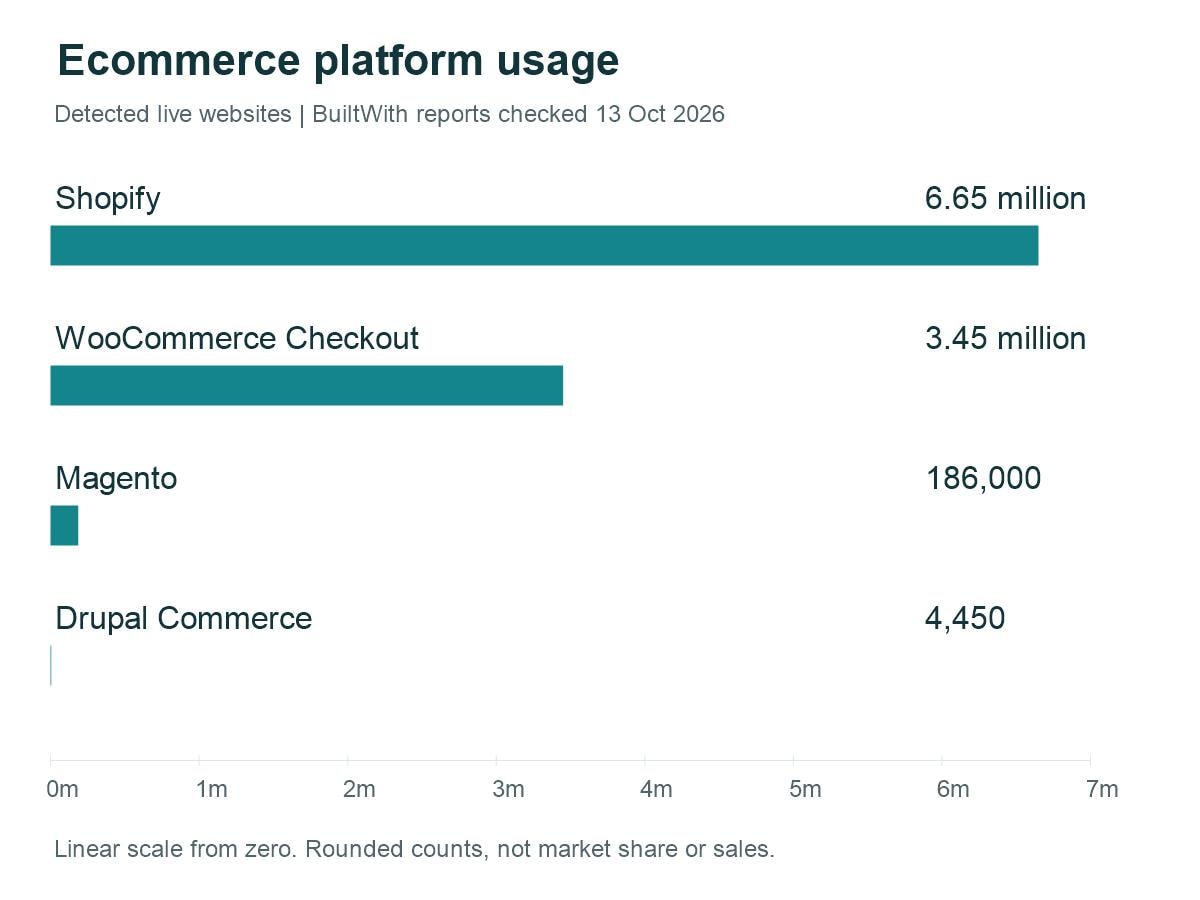
These are technology-detection counts, not sales figures, unique merchant totals or an exact share of all online shops. BuiltWith tracks WooCommerce Checkout separately from the broader WooCommerce plugin, which can appear on sites without an active shop. Detection rules and update dates differ, and the same website can use more than one technology. Other datasets may therefore show a different ranking.
Use popularity as background information. Your product needs, support options and total costs should decide your shortlist.
Which ecommerce platform is most cost-effective for your website?
For a typical small business, start by comparing Shopify and WooCommerce. The better value depends on what you already have and who will run the store.
- New shop with no technical team: Start with Shopify. Managed hosting can reduce technical work, provided you do not need many paid apps or custom changes.
- Existing WordPress website: Start with WooCommerce. Reusing the website and existing skills may save money, but include a maintenance budget.
- Complex store with a development team: Assess Magento Open Source or Adobe Commerce against a detailed brief. Pay for complexity only when it solves a real business need.
- Existing Drupal website with custom content workflows: Assess Drupal Commerce. Reusing your Drupal setup may make more sense than running a separate shop.
Ask each provider or developer to price the same product catalogue, design, payment methods and integrations. Compare setup plus two years of running costs, including staff time. A slightly higher subscription can be good value if it saves regular support work.
Calculate the full ecommerce platform cost
A low monthly price does not show the whole cost. Build a simple first-year budget for each option using the same expected order volume.
- Platform subscription or hosting fees.
- Design, setup and product migration.
- Paid themes, apps and extensions.
- Payment processing and any extra platform transaction fees.
- Maintenance, backups and support.
- Staff time for training and regular tasks.
As a hypothetical example, a £30 monthly plan plus £40 of apps already costs £70 each month. That is £840 a year before payment fees, setup or staff time. A higher-priced plan may cost less overall if it includes the features you need.
Prices, payment options and plan limits can vary by country and change over time. Check current terms on the provider’s website, such as Shopify’s plan comparison, before making your budget.
Test everyday tasks and mobile checkout
Use a trial or demo to carry out real work. Add a product with several options, change its price and update the stock count. Ask the person who will run the shop to try these tasks too.
Next, use a phone to find a product and complete a test order through the platform’s supported test process. Check that buttons are easy to tap, delivery costs are clear and error messages explain what to fix.
Also test refunds, order emails and stock updates. A polished homepage cannot make up for a confusing checkout or slow order management.
Check SEO, speed and essential connections
Look for control over page titles, meta descriptions, product URLs and image alt text. Check how the platform handles redirects when a page address changes. These tools support SEO, but they do not guarantee search rankings.
Test realistic pages with your chosen theme and apps. If you are considering WordPress, our guide to common causes of a slow WordPress website explains problems to watch for.
Then check the connections your business needs. These might include your accounting software, email tool, delivery service or in-store stock system. Confirm which data moves between them and whether updates happen automatically.
Do not stop at finding an app with the right name. Test whether it supports your actual workflow, and include its fees in the budget.
Choose an ecommerce platform that can support growth
Think about the next one or two years. You may need more staff accounts, a larger catalogue, wholesale prices or another language. Ask which changes need a higher plan, an extension or custom development.
Check support hours and who handles each type of problem. For a self-hosted shop, agree who will manage updates, backups and recovery. For any store, protect staff accounts and review who can access customer data.
Finally, ask how you can leave. Check whether you can export products, customer records and orders in a usable format. Themes, app settings and some other data may need separate work when you move.
Make your final choice with a short test
Shortlist two or three options. First, reject any that cannot meet an essential requirement. Then score the remaining choices from one to five for cost, daily use, checkout, connections and support.
- Add a small sample of real products.
- Test an order, refund and stock change.
- Connect your most important business tool.
- Confirm the full first-year cost.
- Try exporting sample data and asking a support question.
Choose the platform that fits your business and that your team can manage confidently. Before committing, write down your essential features, budget and test results. Those three things will give you a clearer decision than a long list of features you may never use.