
JSONL Explained: The One-Line Format That Makes Data Pipelines Easier
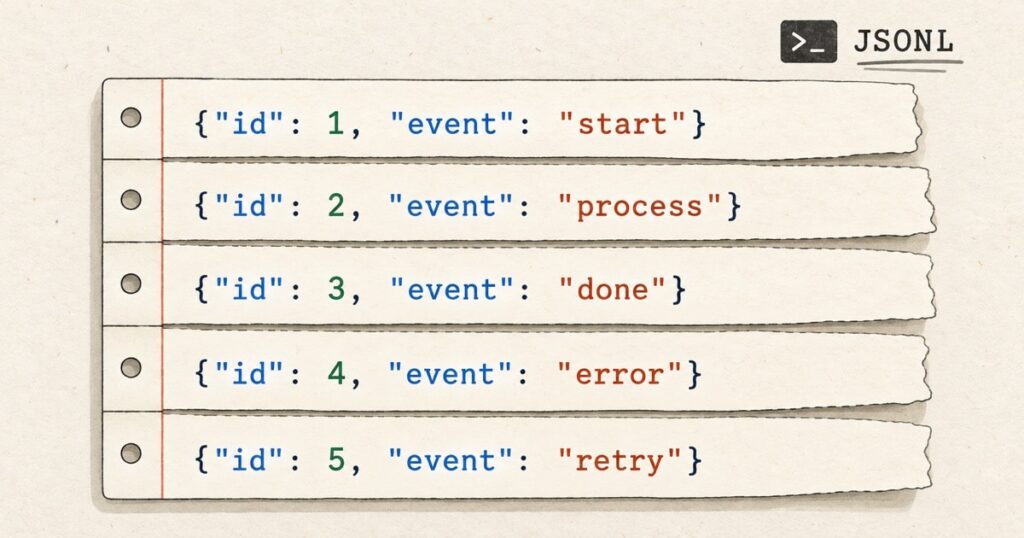
JSONL is the practical version of JSON for workloads made of many independent records. A conventional JSON array is excellent for a bounded document. It becomes awkward when an export grows into millions of items, a log never ends, or an ingestion job must identify and isolate a bad record without loading the whole file.
JSON Lines, commonly written as JSONL and also called newline-delimited JSON or NDJSON, changes one thing: every physical line is a complete JSON value. That framing makes records independently parseable, appendable and recoverable. It is why JSONL appears in data warehouses, bulk APIs, logging pipelines and machine learning datasets.
This guide explains the exact rules, the streaming model, real-world uses, validation, security boundaries and the cases where another format is the better engineering choice.
What JSONL means
A JSONL file is UTF-8 text in which each line contains one valid JSON value. In most production contracts, that value is an object representing one event, document, row or work item.
{"event":"page_view","userId":"u_123","at":"2026-09-21T09:30:00Z"}
{"event":"purchase","userId":"u_123","amount":49.99,"at":"2026-09-21T09:32:10Z"}
{"event":"logout","userId":"u_123","at":"2026-09-21T09:36:42Z"}
The JSON Lines documentation defines three essentials: UTF-8 encoding, one valid JSON value per line, and line-feed delimiters. CRLF also works because JSON permits surrounding whitespace. A final newline is strongly recommended because it makes producing and concatenating files safer.
The complete file is not a JSON array. There is no outer [ and ], and no commas between records:
// A normal JSON array
[
  {"id":1,"name":"Ada"},
  {"id":2,"name":"Grace"}
]

// JSONL
{"id":1,"name":"Ada"}
{"id":2,"name":"Grace"}
Technically, a line may be an array, string, number, boolean or null. Object-per-line is the useful convention for shared systems because it gives every record named fields and leaves room for identifiers, timestamps and schema versions.
Why JSONL changes the operational model
A JSON array invites a document-oriented workflow. JSONL makes the record the unit of work. A consumer can parse, validate, persist and discard one record as soon as it has reached a newline.
| Concern | JSON array | JSONL |
|---|---|---|
| Whole file | One complete JSON document | A sequence of JSON texts |
| Append | Needs comma and closing-bracket handling | Write another terminated line |
| Memory | Often encourages whole-file parsing | Can process one record at a time |
| Bad input | Can invalidate the whole document | Can identify a specific line |
| Pretty printing | Allowed | Not inside a record |
| Partitioning | Needs structural awareness | Split at a line boundary |
That does not magically turn JSONL into a database, queue or transaction log. It simply creates a stable record boundary. The rest, including delivery guarantees, ordering and duplicate handling, remains a system-design concern.
Streaming JSONL correctly
Newlines identify records, but network chunks do not. TCP and HTTP may split one JSONL record across multiple chunks, or put several records in a single chunk. Calling split("n") on every received chunk loses incomplete data.
A correct reader keeps a remainder buffer, emits complete lines, and retains the incomplete final fragment until the next chunk. A normal JSON serializer escapes a newline inside a string as n, so an unescaped physical newline remains a safe record delimiter.
async function* parseJsonl(chunks) {
  let remainder = "";
  const decoder = new TextDecoder();

  for await (const chunk of chunks) {
    remainder += decoder.decode(chunk, { stream: true });
    const lines = remainder.split("n");
    remainder = lines.pop() ?? "";

    for (const line of lines) {
      if (line.trim() === "") continue; // Chosen and documented policy
      yield JSON.parse(line);
    }
  }

  if (remainder.trim() !== "") {
    yield JSON.parse(remainder);
  }
}
For files, a line reader gives the same memory benefit:
import json

with open("events.jsonl", encoding="utf-8") as source:
    for line_number, line in enumerate(source, start=1):
        if not line.strip():
            continue
        try:
            event = json.loads(line)
        except json.JSONDecodeError as error:
            raise ValueError(f"Invalid JSONL at line {line_number}") from error
        process(event)
Python’s standard JSON command includes --json-lines, which parses every input line separately. It is useful for small-file checks. A production consumer still needs validation beyond parsing.
Why JSONL works well for append-only data
Appending to a JSON array requires locating the closing bracket and choosing whether a comma is needed. It is fragile under interruption and awkward with concurrent writers. JSONL is append-oriented: serialize one record, add n, then flush according to the durability policy.
{"schemaVersion":1,"id":"evt_01J8","type":"invoice.created","occurredAt":"2026-09-21T09:30:00Z","data":{"invoiceId":"inv_42"}}
{"schemaVersion":1,"id":"evt_01J9","type":"invoice.paid","occurredAt":"2026-09-21T09:32:10Z","data":{"invoiceId":"inv_42","amount":"49.99","currency":"GBP"}}
The format does not provide atomicity. A final line may be truncated, retries may duplicate records, and parallel writers may reorder them. Use immutable IDs, idempotent consumers, offsets or manifests, and an explicit policy for a partial final line.
JSONL in real systems
JSONL is established infrastructure. BigQuery treats ndJSON and JSON Lines as the same format, loading one JSON object from each line. Its documentation also exposes a valuable trade-off: gzip often cuts transfer and storage cost, but a gzip-compressed JSON input cannot be read in parallel.
Elasticsearch’s Bulk API uses NDJSON for action metadata and optional source documents. It requires the final newline and warns against pretty printing. This supports fast routing because a receiving node can inspect action metadata without first buffering a giant enclosing array.
Structured logs are another natural use. A logger writes one event to standard output, a shipper forwards it, and operators can inspect it with line-oriented tools. The format fits observable event histories particularly well. For the wider design question of tracing independently observable work, see AI Agent Evaluation in Production: Trace the Path, Verify the Outcome.
JSONL, JSON-LD and JSON Text Sequences are different
JSON-LD and JSONL have similar names but separate purposes. JSON-LD adds semantic context and graph relationships. JSONL supplies record framing. A JSONL line can contain JSON-LD, but neither is a substitute for the other.
A closer alternative is RFC 7464 JSON Text Sequences. It prefixes every JSON text with the ASCII Record Separator byte, 0x1E, and ends it with a line feed. The registered media type is application/json-seq.
That extra delimiter permits a record to be pretty printed across several lines. JSONL deliberately uses ordinary newline framing instead. Prefer JSON Text Sequences when a formal IETF media type or multi-line JSON texts matter. Prefer JSONL when readable files and ubiquitous line-oriented tools are the priority.
Extensions, media types and interoperability
.jsonl and .ndjson describe the same practical byte format. The JSON Lines documentation suggests application/jsonl; the community NDJSON specification suggests application/x-ndjson. Neither is universally accepted. The receiver’s documented contract is authoritative.
For example, Elasticsearch accepts application/x-ndjson for Bulk requests. Do not guess a content type in an integration test, especially where a gateway or API framework applies strict request parsing.
Validation has three distinct layers
A successfully parsed line is not necessarily a valid business record. Reliable ingestion separates:
- Framing validation: UTF-8, line boundaries and a documented empty-line policy.
- Syntax validation: every accepted line parses as JSON.
- Contract validation: required fields, types, schema version, identifiers, timestamps and domain constraints.
from datetime import datetime

def validate_event(record):
    required = {"schemaVersion", "id", "type", "occurredAt", "data"}
    missing = required - record.keys()
    if missing:
        raise ValueError(f"Missing fields: {sorted(missing)}")
    if record["schemaVersion"] != 1:
        raise ValueError("Unsupported schema version")
    datetime.fromisoformat(record["occurredAt"].replace("Z", "+00:00"))
    if not isinstance(record["data"], dict):
        raise ValueError("data must be an object")
Blank lines need an explicit choice. JSON Lines says that a blank line is not a JSON value. The NDJSON specification permits a parser to ignore empty lines only when that behaviour is documented and configurable. Strict rejection is often safest for data exchange. Skipping blanks while recording a metric may be a reasonable log-processing policy.
Failure handling and security
Line-level recovery is useful, but it should not turn into silent data loss. Decide whether a malformed record stops the batch, moves to quarantine, or is skipped with a durable error report. Include the input identifier, line number and safe error reason. Do not put sensitive raw records into diagnostic logs.
Treat every record as untrusted input. Apply line-size limits, nesting-depth limits where supported, stream rate limits and allow-list schemas. Be deliberate about duplicate JSON keys because parser behaviour varies. Syntactic JSON validity does not establish that a record is authorised, complete or safe to act on.
RFC 7464 also makes the broader boundary clear: sequence framing provides no cryptographic integrity protection. Use transport security, and use signatures, hashes, manifests or authenticated storage where the threat model needs tamper evidence.
When JSONL is the wrong choice
Use a normal JSON document for a small coherent payload such as configuration, a REST response, a manifest or saved UI state. Use CSV when the data is genuinely flat and spreadsheet exchange is the priority. Use Parquet, Avro or another binary format when analytical scan performance, typed schemas or compression behaviour matter more than direct readability.
If delivery guarantees, consumer coordination and replay are the actual problem, use a message broker protocol. JSONL can carry the records, but it cannot provide those properties on its own.
A production-ready JSONL checklist
- Use UTF-8 and compact, one-line JSON objects.
- Terminate every emitted record, including the last, with
n. - Include a schema version, immutable ID and timestamp when records can evolve or replay.
- Buffer network chunks until a complete line is available.
- Validate syntax and business rules separately.
- Define what happens to blank, malformed and truncated lines.
- Make consumers idempotent when retries or replay are possible.
- Use the exact extension and media type required by the receiving system.
- Set input limits and avoid leaking raw sensitive data in errors.
The useful simplicity of a newline
JSONL does not replace JSON. It makes JSON practical when the workload is a sequence rather than a document. The newline creates a unit that engineers can stream, append, split, retry, inspect and account for.
That clarity is its advantage. When a system must move many independent records through an uncertain world, a simple reliable boundary is often more valuable than a more elaborate format.
Further reading
- JSON Lines format documentation
- NDJSON community specification
- RFC 7464: JSON Text Sequences
- Python JSON documentation
- BigQuery JSONL loading documentation
The post JSONL Explained: The One-Line Format That Makes Data Pipelines Easier appeared first on Alpesh Kumar.